5/16/2012

SEO Marketing Blogger Template


Template Details :
Platform Type Blogger / Blogspot
Template Name  : SEO Marketing Blogger Template
Instructions URL  : How to install blogger template?
Designer :  Sohan Jayasinghe (http://premiumbtemplates.com/)
Features 2 column,Web 2.0, 1 sidebar, Black, Blue, Green, White, Fixed, Right Sidebar, Smooth Menubar, Wide Smooth Slideshow, 3 column Footer, Ready for Seo post, Round corners etc.


Descriptions
SEO Marketing Blogger Template is a free blogger template regarding SEO. It has2 column,Web 2.0, 1 sidebar, Black, Blue, Green,White, Fixed, Right Sidebar, Smooth Menubar, wide Smooth Slideshow, 3 column Footer, Ready for Seo post, Round corners and many other features.
This template is suitable for all types of blogs


Search Tag :
SEO Marketing Blogger Template
SEO Marketing Blogspot Template
SEO Marketing B Template
SEO Marketing Blogger Theme
SEO Marketing Blogspot Theme
SEO Marketing B Theme

5/14/2012

BeyondSuvs Blogger Template


BEYONDSUVS BLOGGER TEMPLATE

BeyondSuvs Blogger Template is a free magazine blogger template that has been converted from wordpress theme. This template takes the theme of the car with beautiful dark colored background. Template features: 3 column layout, 1 left sidebar and 1 right sidebar, black background, ads space ready at the header, bookmark space ready at top sidebar, slider menu, dropdown menu and several other features. This template is suitable for blogs about sports car or vehicle.

Author : Lasantha - http://www.premiumbloggertemplates.com
Designer URL : http://newwpthemes.com

x10 Masonry Red

5/03/2012

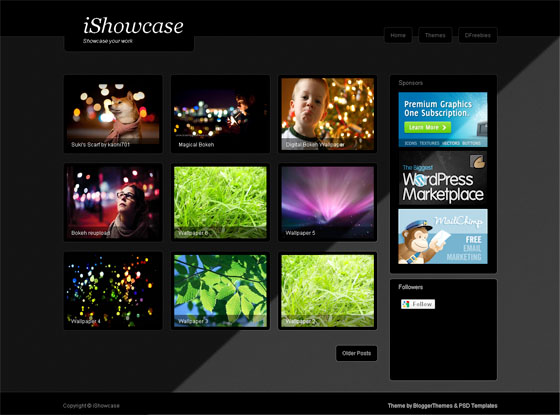
iShowcase


iShowcase is a Freemium blogger theme we created for Showcase,Gallery,Portofolio Blogs.This Gallery style blogger template works well on all major browsers.
This Blogger Theme is for use in your personal projects, and cannot be used without attribution. You should not redistribute this blogger template without our permission.


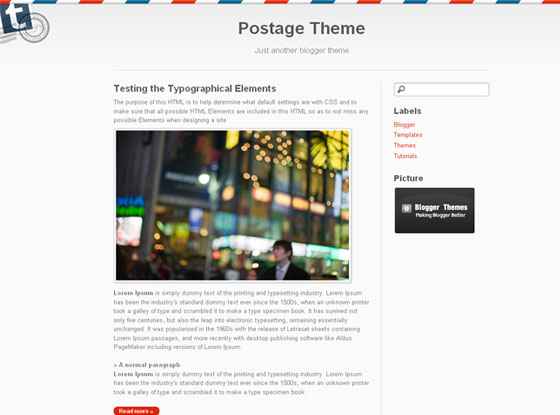
Postage


Postage is a Blogger Theme that is perfect for a traveler to share his experiences around the world.
Go to Design > Edit HTML and Find the codes below
Replace the # symbol with your Twitter URL o
r anyother URL